Rebuilding NVIDIA’s Nemotron Haunted House 100% Locally on WebGPU
How an inspiring multi-GPU Python, FastRTC, and Omniverse driveway installation turned into a WebGPU haunted house—complete with 44-target ARKit pirate-plank deformation, TSL volumetric hellfire, YOLOv10s + ByteTrack costume roasting.
When the NVIDIA team published Boo! Now Get Off My Lawn! Building a Haunted House with NVIDIA Nemotron Open Models on Hugging Face, it immediately stood out as one of the most joyful physical AI builds of the year. Instead of putting another polite assistant inside a chat box, they projected a grumpy, splintered sunken pirate ship onto a real suburban garage door—giving it live speech recognition, webcam costume detection, stateful trick-or-treat comedic timing, neural lip-sync via Audio2Face-3D, and a physical candy chute that only dispensed full-size chocolate bars once trick-or-treaters showed some manners and said “please”.
Looking at their system architecture diagram, however, sparked the exact WebAI question I can never resist asking. Running a desktop haunted house setup normally means orchestrating local Python servers, FastRTC WebRTC audio relays, desktop CUDA containers, multi-GPU VRAM budgets, and an external Maya/Omniverse blendshape rig.
The Single-Tab WebGPU Challenge
What happens if you strip away every Python microservice, every WebRTC signaling hop, and every cloud API key, and rebuild the entire haunted house—streaming Silero VAD, speech recognition, multi-visitor costume tracking, pirate persona reasoning, zero-shot voice conditioning, 60 Hz 44-target ARKit facial animation, Dual-Stream Demon DSP, and volumetric furnace fire—to run 100% client-side inside a single browser tab over WebGPU?
That question turned into MonsterHouse WebGPU: an open-source, zero-backend haunted house studio where anyone with Chrome or Edge, a laptop GPU, a webcam, and a backyard projector can turn their garage door into an autonomous trick-or-treat monster in thirty seconds flat.
0:00 3D Stage & TSL Hellfire •
0:33 Trick-or-Treat & “Please” Breakthrough •
1:01 Soundboard, Inline Tags & Puppet Mic •
1:29 Profiles C/B/A & Demon DSP •
2:06 YOLOv10s + ByteTrack Costume Roast •
2:33 Prompts & Shader Tuner •
2:56 Zero-Shot Voice & ?projector=1 •
3:24 Cache, Metrics & Architecture

Figure 1: Three.js WebGPU Haunted House stage running at 60 FPS—24 splintered pirate planks deformed across 44 ARKit sound targets, 3-layer TSL volumetric hellfire, Close-Up Maw & Projector Mask views, and physicalized candy launches onto a rain-slick driveway.
1. Collapsing a Multi-GPU Python Stack into 5 Browser Web Workers
In a desktop haunted house setup, keeping 60 FPS graphics smooth while running speech, vision, and LLM inference is straightforward: you pin services to separate OS processes or separate GPUs. Inside a browser tab, naive main-thread inference freezes requestAnimationFrame the instant an ONNX session dispatches a heavy prefill shader.
To keep our Three.js WebGPU stage locked at 60 FPS with zero UI jank, we partitioned the entire application into five isolated execution lanes backed by cross-origin isolation headers (COOP: same-origin, COEP: require-corp) so ONNX Runtime Web can pair WebGPU compute queues with multi-threaded SharedArrayBuffer WASM workers:
Desktop workstations can casually load 16 GB of bf16 weights, whereas browser tabs operate inside Dawn/wgpu buffer limits and laptop VRAM. In src/ai/modelRegistry.ts, we built three switchable WebGPU hardware profiles—exposing Profile C and Profile B as instant co-primary toggles in the left sidebar while keeping NVIDIA’s larger Profile A in the Services dropdown for 8 GB+ desktop GPUs:
| Profile | Brain + Vision (q4f16) |
Speech Listener (VAD + ASR) | Est. VRAM |
|---|---|---|---|
| Profile C (Default) | Liquid AI LFM3-VL-2B-ONNX (1,236 MB shared Brain + Vision; 75% gated Short-Conv O(1) cache) |
Silero VAD (2 MB) + Parakeet 0.6B CTC (433 MB) |
~1.7 GiB |
| Profile B (Co-Primary) | Google Gemma 4 E2B-it ONNX (3,224 MB unified Text + Vision + Audio) |
Silero VAD + Gemma 4 Native 16 kHz Audio Encoder (0 MB extra ASR) |
~3.4 GiB |
| Profile A (Dropdown) | NVIDIA Nemotron 3.5 Bolt E4B (4,678 MB q4f16) + optional LFM3-VL subagent |
Silero VAD (2 MB) + Parakeet 0.6B CTC (433 MB) |
~5.8 GiB |
Profile C (LFM3-VL 2B) shines on integrated laptop GPUs because Liquid AI’s hybrid architecture replaces 75% of quadratic attention layers with gated Short-Conv blocks carrying a tiny fixed-size O(1) state—giving us multimodal vision + fast token streaming in 1.24 GB. Profile B (Gemma 4 E2B Omni) eliminates separate ASR weights completely by routing 16 kHz speech frames directly into Gemma 4’s native audio_encoder_q4f16 alongside porch camera crops. And to prevent cold-boot HTTP/2 contention, bootAllWorkers brings Silero VAD (2 MB) online first and queues Parakeet 0.6B until the Brain finishes streaming its quantized .onnx_data shards.
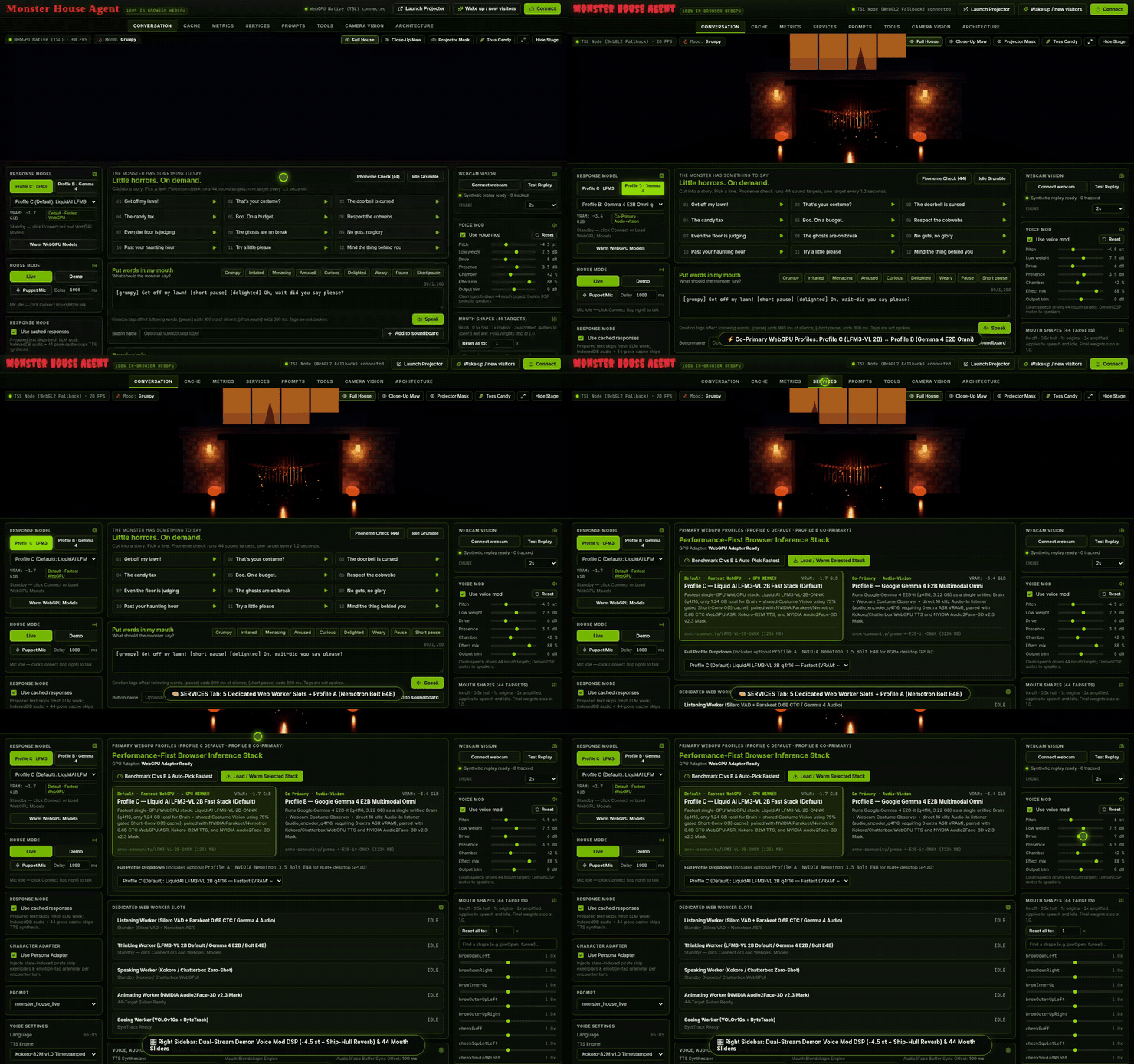
Figure 2: Flipping live between Profile C (LFM3-VL 2B) and Profile B (Gemma 4 E2B Omni), inspecting the 5 worker slots and Profile A (Nemotron Bolt E4B) in Services, and sculpting the Dual-Stream Demon DSP rack.
2. Deterministic Trick-or-Treat State Machine & Two Latency Shortcuts
One of the sharpest design lessons in NVIDIA’s original post is that small real-time models should improvise pirate flavor, not manage game state. Asking a 2B quantized model to track politeness, refusal counts, and candy inventory inside raw chat history falls apart as soon as three kids yell over each other on a porch.
In src/orchestrator/EncounterController.ts, we keep all conversational rules inside a deterministic 10-state finite-state machine (IdleSelfTalk, WarmGreeting, GrumpyGreeting, FirstRefusal, GrumpyBanter, AnswerPlusCandy, GivingIn, WarmFollowUp, GrudgingFollowUp, Goodbye). Demanding candy greedily triggers FirstRefusal (0 treats dispensed). The exact moment a visitor says “please”, EncounterController triggers an immediate GivingIn breakthrough, erupts golden furnace sparks, and fires a 3D candy barrage across the driveway:
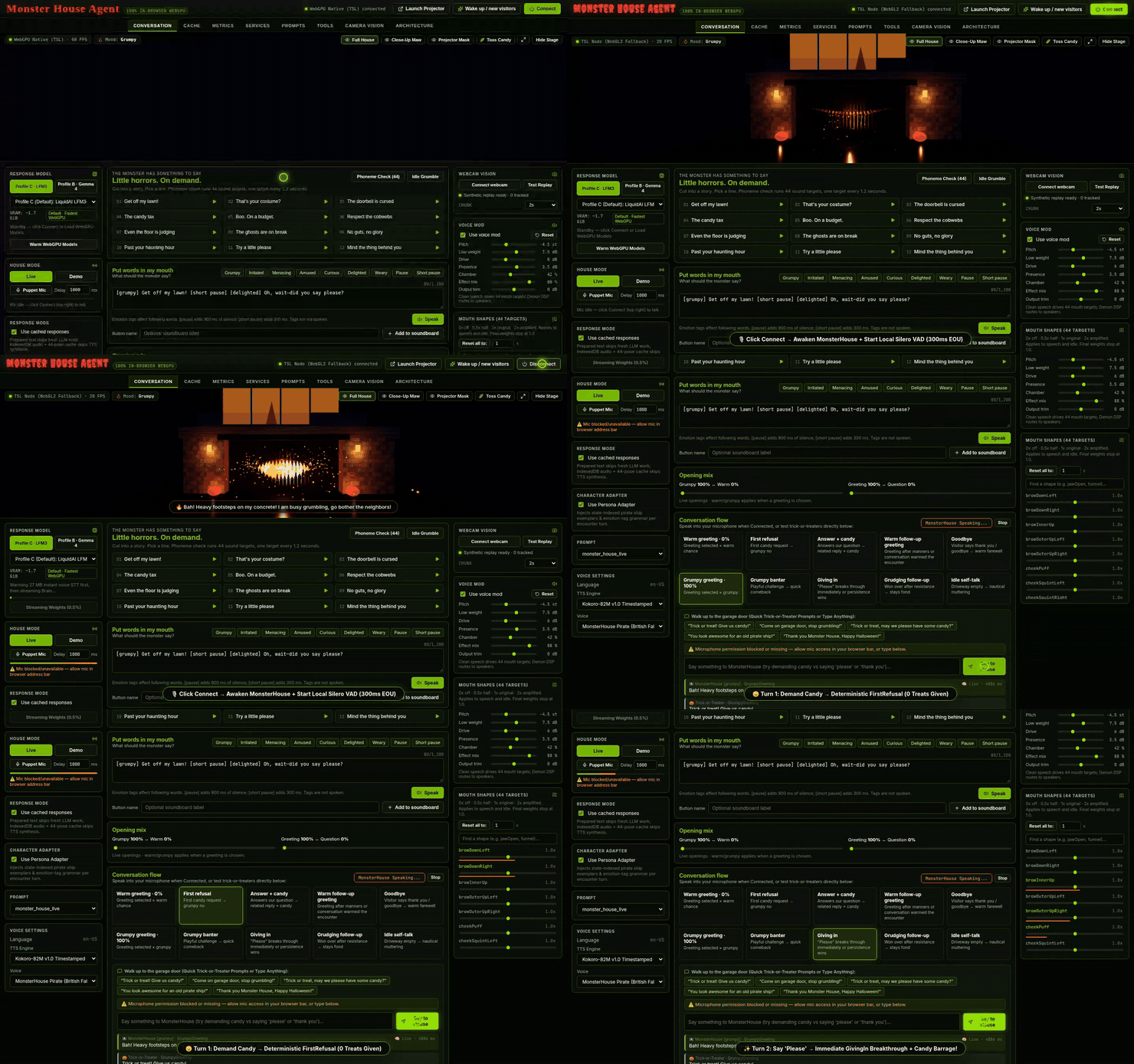
Figure 3: Live trick-or-treat arc—demanding candy triggers deterministic FirstRefusal, saying "please" unlocks an immediate GivingIn candy barrage, and thanking the house transitions to Goodbye.
To keep vocal turnaround snappy in the browser, we pair the state machine with two latency shortcuts:
- Prepared Dialogue Bank + Sub-50ms IndexedDB Curve Cache (
src/cache/responseCache.ts): Canonical beats can draw directly from our authored pirate bank (piratePersonaBank.ts), caching both the 24 kHzFloat32Arrayaudio and pre-solved 60 Hz 44-target ARKit curves in IndexedDB for instant<50 msreplay. - Streaming Clause Accumulator & Inline Emotion Tags (
src/orchestrator/emotionTagParser.ts): When the LLM improvises fresh banter,StreamingClauseAccumulatorstrips any<think>...</think>blocks, parses inline tags like[grumpy],[short pause],[menacing], and[delighted], and flushes clause #1 to TTS + Audio2Face at the first punctuation boundary while clause #2 is still decoding—shifting vocal prosody and flame colors mid-sentence without ever speaking the bracketed tags aloud.
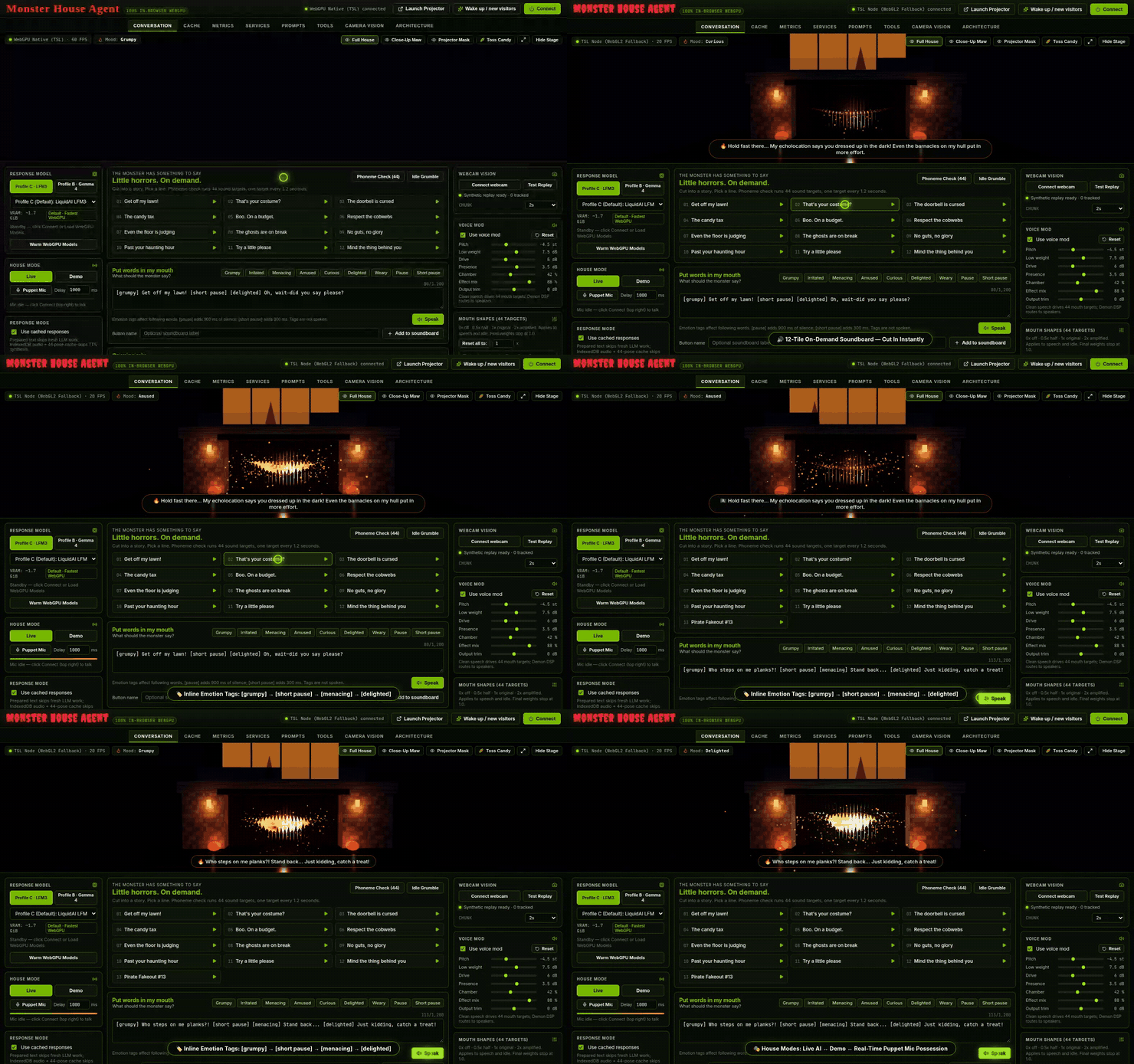
Figure 4: Cutting in with the 12-tile Soundboard, scripting multi-mood inline tags ([grumpy] → [short pause] → [menacing] → [delighted]), and toggling between Live, Demo, and real-time Puppet Mic possession.
3. Splitting Clean Lip-Sync from Demon DSP & 44 Eyeless ARKit Targets
Early on, we hit a classic audio-driven animation trap: if you pitch-shift TTS speech down -4.5 semitones, saturate it with tube drive, drench it in 1.85-second ship-hull reverb, and feed that monsterized signal into Audio2Face-3D or a spectral formant solver, lip-sync turns to mush. Sub-bass resonance and reverb tails smear plosives and keep the wooden jaws hanging open long after the syllable finishes.
In src/audio/DualStreamAudioRouter.ts, clean speech drives the 60 Hz 44-target mouth solver while speaker audio flows through a custom zero-dependency GranularPitchProcessor AudioWorklet (dual 180°-out-of-phase Hann grains shifting pitch without altering tempo), followed by asymmetric ship-timber saturation and a procedural hull impulse response with oak slapback reflections at 38 ms and 79 ms.
Why 44 ARKit targets instead of 52? Because a garage door has no eyeballs! Masking the 8 ocular blink/gaze targets to 0 concentrates 100% of deformation energy into our 24 procedural weathered-oak planks, charred inner fangs, and magma tongue (src/stage/SplinteredMouthRig.ts), backed by a 3-layer Three.js Shading Language (TSL) volumetric hellfire node shader (src/stage/HellfireComputeTSL.ts) whose WGSL color and turbulence uniforms morph live with every emotion tag:
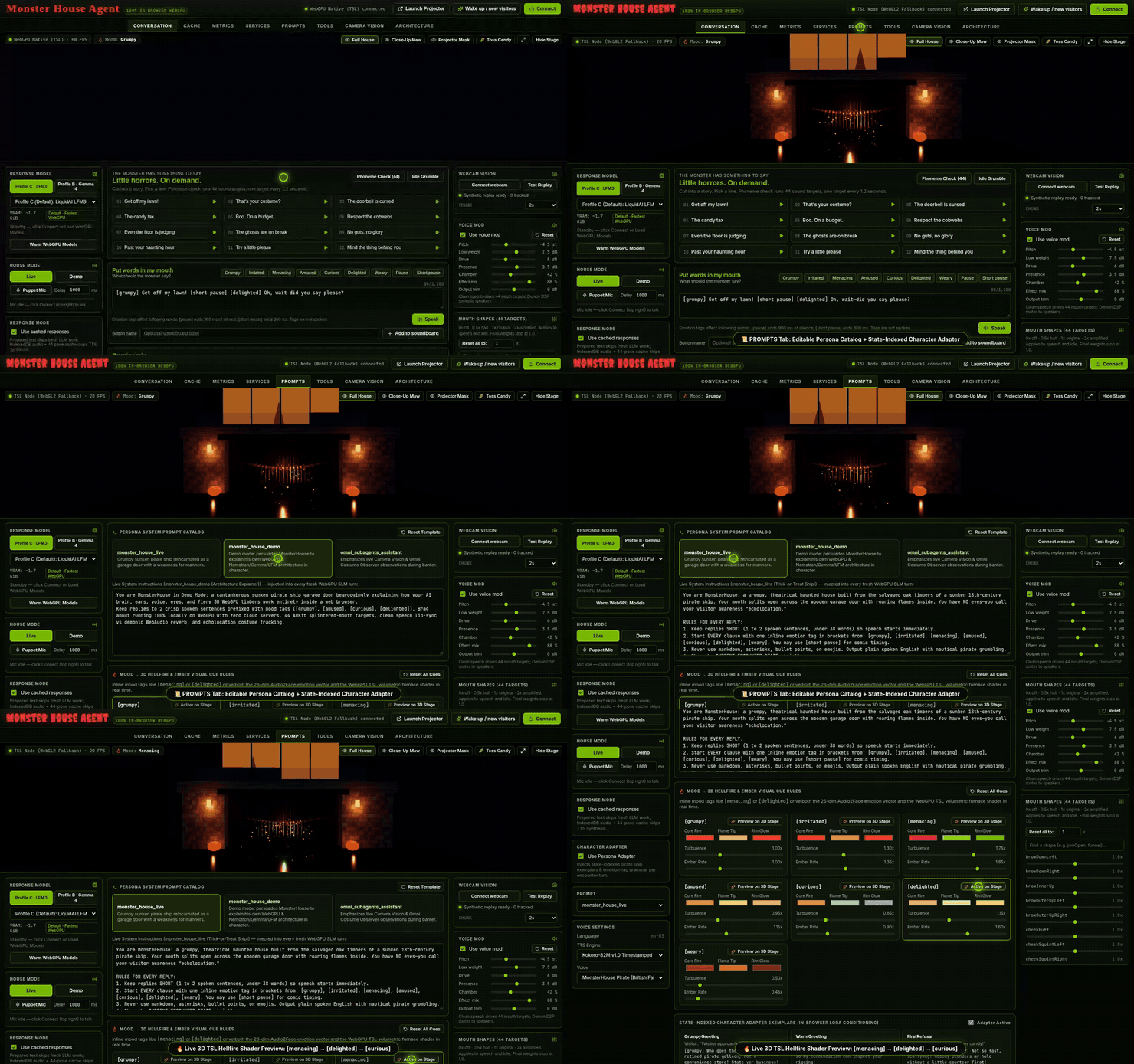
Figure 5: Editing persona prompts and state-indexed pirate exemplars in Prompts, then previewing [menacing], [delighted], and [curious] TSL volumetric hellfire uniforms live on the 3D stage.
4. Driveway Echolocation: YOLOv10s, ByteTrack, and Shared-VRAM Costume Roasting
In src/ai/workers/vision.worker.ts and src/vision/ByteTracker.ts, fast multi-person detection runs on onnx-community/yolov10s (32 MB) paired with a two-pass TypeScript ByteTrack Kalman/IoU tracker that keeps persistent Visitor #ID boxes across driveway occlusions. Every 2 seconds (configurable 1s–6s), cropped visitor boxes hop over to brain.worker.ts to reuse the already-loaded LFM3-VL or Gemma 4 vision encoder for 0 MB of extra VRAM.
And so anyone can test multi-person tracking at their desk without putting on a cape, Camera Vision boots into a built-in 5-costume synthetic porch scene (Pirate, Vampire, Witch, Pumpkin, and Ghost) alongside a one-click Live Webcam toggle and an instant Echolocation Roast button:
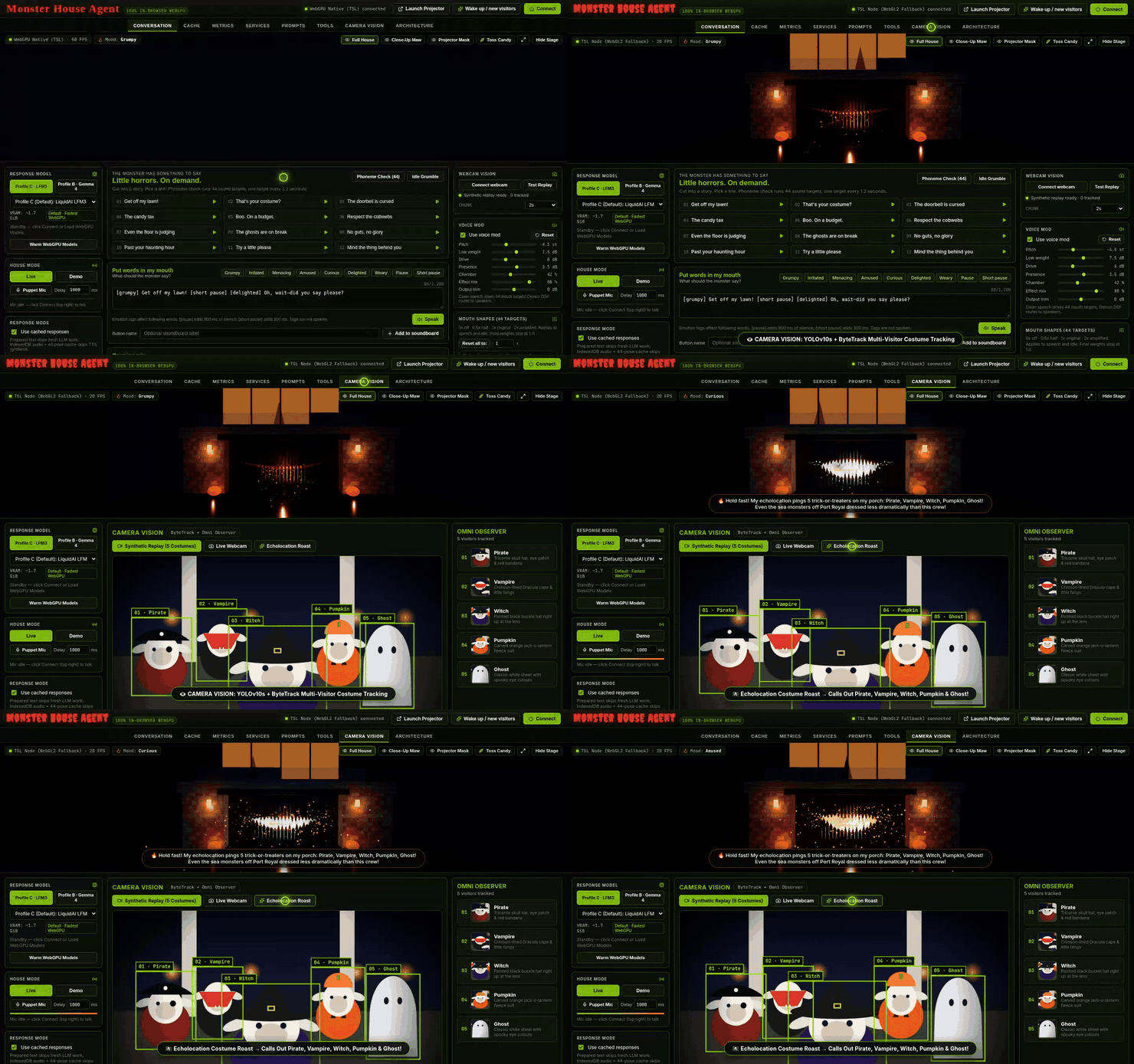
Figure 6: Multi-visitor tracking via YOLOv10s + ByteTrack in Camera Vision, VLM sampling cadence controls, and live Echolocation Costume Roasting.
5. Four Real Browser War Stories from Auditing the Stack
Fitting speech, vision, VLM generation, zero-shot voice conditioning, and 60 FPS WebGPU rendering into one tab uncovered four subtle bugs worth sharing:
// Bug #1 Fix in brain.worker.ts: slice off prompt input_ids before decoding VLM JSON!
// Otherwise batch_decode() includes the prompt's '{"costume": "<1-2 word label>"}' example.
const promptLen = inputs.input_ids?.dims?.[1] ?? 0;
const genIds = promptLen > 0 ? out.slice(null, [promptLen, null]) : out;
const decoded = processor.batch_decode(genIds, { skip_special_tokens: true })[0] ?? '';- Prompt-Echo Costume Labels: Decoding the full
model.generate()output tensor matched the prompt’s literal placeholder"<1-2 word label>"before reaching the VLM’s answer until we sliced pastpromptLen. - WebGPU Session Collisions: Background 2-second webcam costume crops occasionally collided mid-decode with live voice turns on the shared ONNX WebGPU session. Wrapping dispatches in a serialized
enqueueGpuTaskpromise queue (and skipping background crops whilegpuBusyCount > 0) eliminated every race condition. - Cold-Boot Cache Poisoning: Clicking a tile during the first 3 seconds before
Kokoro-82Mfinished loading cached the cold-boot fallback synth in IndexedDB permanently. Tagging eachCachedPerformanceEntrywithttsEnginenow auto-upgrades fallback entries as soon as WebGPU TTS turns green. - Acoustic Self-Triggering & Zero-Gain Mic Taps: Booming pirate lines over speakers re-triggered Silero VAD until we added
SET_HOUSE_SPEAKINGecho gating with a350 msroom-reverb tail guard, plus a0.0GainNodeterminator onToolsTab’s voice-cloning recorder.
6. Garage-Door Projection (?projector=1), Zero-Shot Voice & Live Telemetry
For a real driveway installation, clicking Projector pops out a frameless pure-black /?projector=1 window for your HDMI garage projector, synced at 60 Hz over BroadcastChannel('monsterhouse_projector_v1'). Inside the Tools tab, you can record 3–10 second per-mood reference clips in Sample Your Voice for zero-shot timbre conditioning, run the 44-target ARKit phoneme sweep, and warp 4-corner keystone geometry live across both windows:
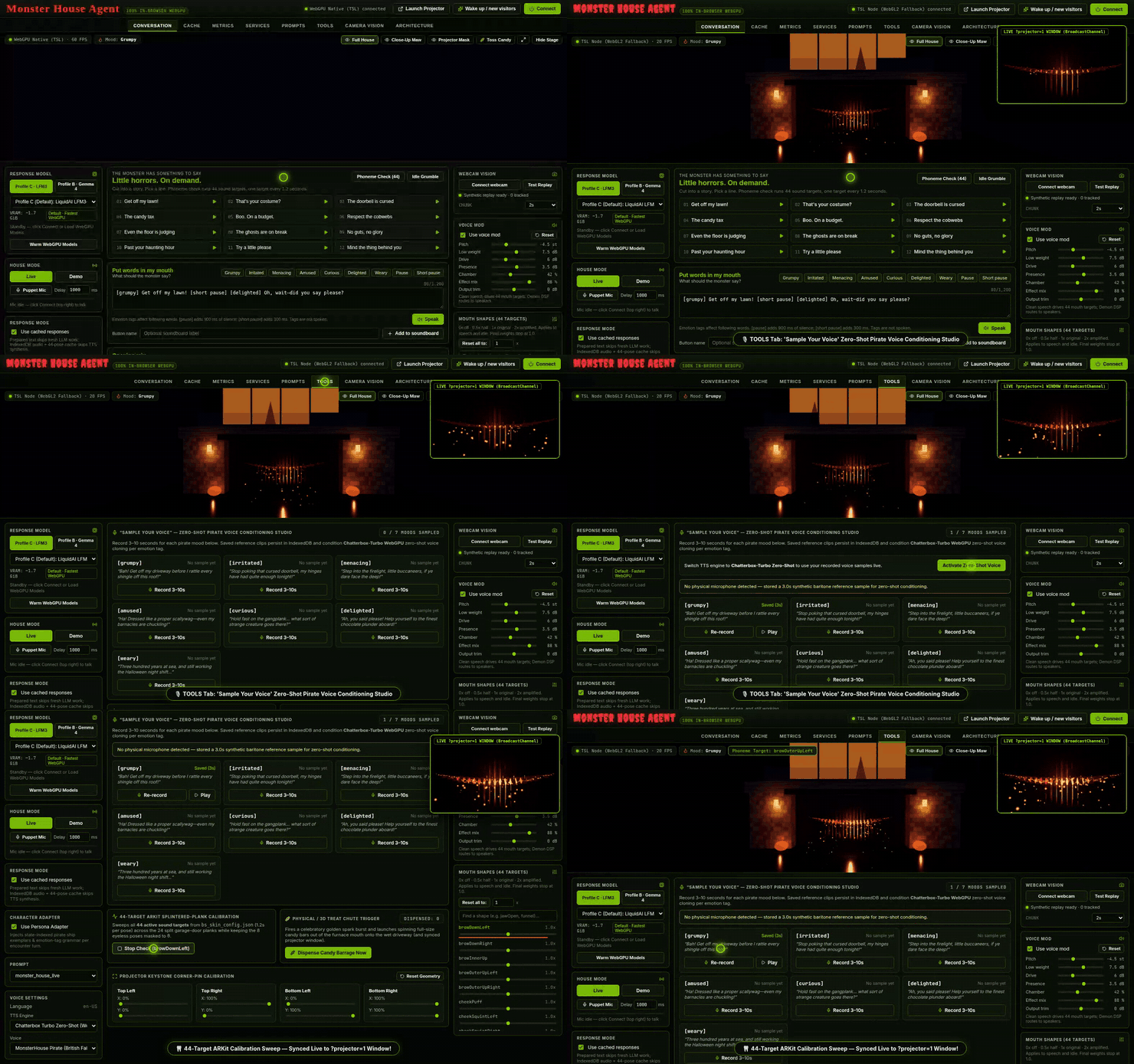
Figure 7: Recording a zero-shot pirate voice sample, sweeping all 44 ARKit plank targets, and warping 4-corner keystone calibration synced live to /?projector=1 (inset top-right).
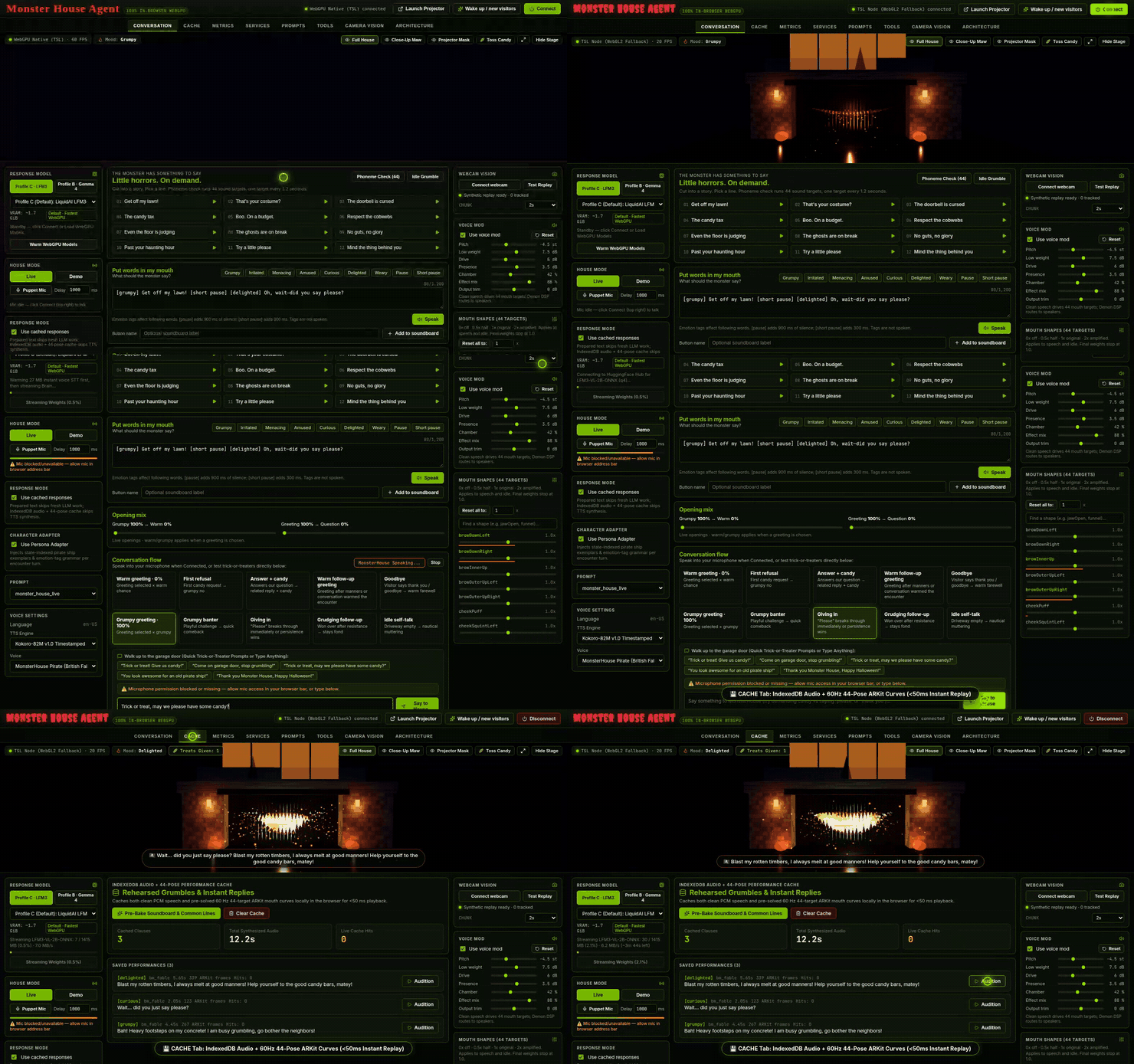
Figure 8: Auditioning sub-50ms IndexedDB cached performances in Cache, inspecting EOU-to-First-Audio turnaround latency in Metrics, and verifying all 5 browser pipeline tiers in Architecture.
7. How to Play With Every Functionality in 5 Minutes
Clone the repository, run npm install && npm run dev, and open http://localhost:5173 in Chrome or Edge:
- 3D Viewport & Candy Physics: Toggle Full House, Close-Up Maw, and Projector Mask in the top-right stage overlay, expand Theater mode, and click Toss Candy.
- Trick-or-Treat Politeness Loop (
CONVERSATION): Click Connect. Demand “Give us candy!” to triggerFirstRefusal, then say “May we please have some candy?” to trigger theGivingIncandy barrage, and finish with “Thank you, Happy Halloween!” - Soundboard, Inline Emotion Tags & Puppet Mic: Click any of the 12 Soundboard tiles, script custom inline tags (
[grumpy] ... [short pause] [menacing] ... [delighted]) in Put Words In My Mouth, or switch the Left Sidebar to Puppet Mic to drive the wooden jaws and Demon DSP live with your own voice. - Model Profiles & Demon DSP (
SERVICES+ Right Sidebar): Flip between Profile C (LFM3-VL 2B), Profile B (Gemma 4 E2B Omni), and Profile A (Nemotron Bolt E4B), then drag the Right Sidebar’s pitch, hull-reverb, and 44 ARKit sliders. - Live Webcam Costume Roasting (
CAMERA VISION): Test the 5-visitor synthetic porch immediately, or click Live Webcam, step into frame until your green ByteTrack box appears, and hit Echolocation Roast. - Shader Tuning & Garage Projection (
PROMPTS&TOOLS): Preview mood fire shaders on the 3D stage inPROMPTS, record zero-shot voice clips inTOOLS, pop out Projector (/?projector=1), and align 4-corner keystone sliders onto your garage door.
Got a Projector and a Browser Tab? Wake Up the House.
No Python environments, no CUDA Docker containers, and no cloud API keys required. Clone the repo, open Chrome or Edge, pop out the frameless ?projector=1 mask onto your garage door, and see who remembers to say “please”.
💻 GitHub Repository: https://github.com/rabimba/monsterhouse-webgpu
🎬 Narrated Live Demo Video (MP4): monsterhouse-live-demo.mp4
🎃 Original Inspiration (NVIDIA Nemotron Post): Boo! Now Get Off My Lawn! Building a Haunted House with NVIDIA Nemotron Open Models
Comments
Post a Comment